
Features
Everything you need to run several accounts as one
Meridian copies your trades across every account, turns your TradingView alerts into NinjaTrader orders, gives you a live chart to trade from, keeps each account inside its rules, helps you review and improve, and keeps you in control from wherever you are. Each feature is tagged with the plan it starts on, like Pro, or All plans — and the free trial includes all of it.
01 — Copying
Every account copied. Every copy checked.
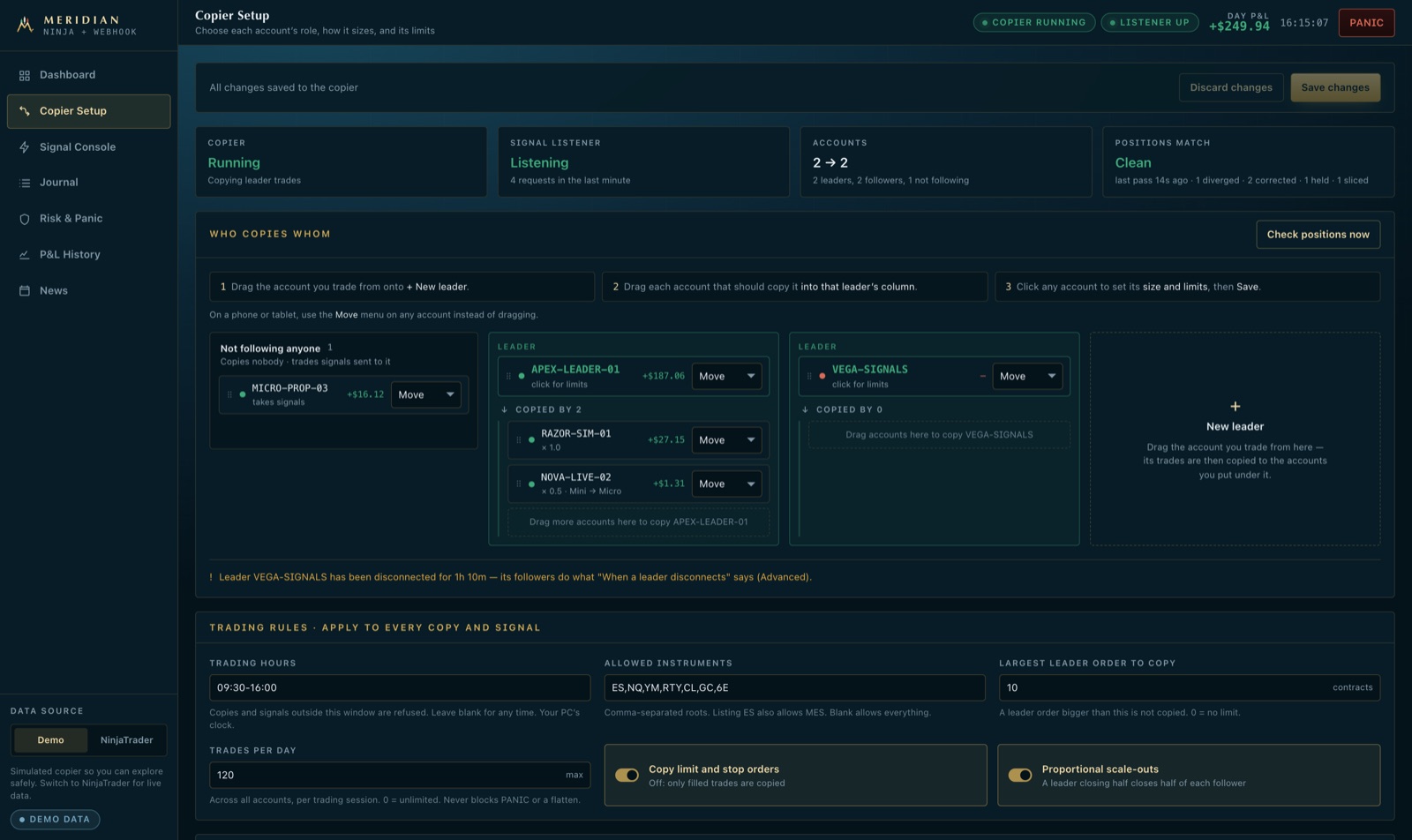
Trade your leader account the way you always do. Meridian places the same trade on every follower in under a millisecond, sized for each one — then checks every account to confirm the copy is right, and fixes it if it isn't.
Sized for each account
All plansSet a ratio per follower, trade micros against minis, cap the contracts any account can hold, and scale out in stages. Each copy is sized from the position the account should end up with.
Checked after every trade
All plansMeridian compares each follower with its leader, account by account. A partial fill, a rejected order or a manual trade is spotted and put right — with the leader's stop and target attached.
A plan for when the leader drops
All plansIf the leader account loses its connection, followers do what you decided in advance: hold their positions, flatten, or pause and tell you. Set it once, override it per account.
Late signals handled safely
All plansA TradingView alert that arrives too late is not chased at a worse price. You are told, and can resend it on purpose. Exits always go through, however late.
Pending orders mirrored
All plansMove or cancel a working order on the leader and every follower's copy moves or cancels with it — no follower is left holding an order its leader no longer has.
Copy quality, graded
ProA grade for every follower each session, and a trade-by-trade view of how fast each copy went out, the price it got against the leader, and anything that was missed.
Told when a copy goes wrong
ProIf a copy can't be placed, is held back by one of your rules, or fills several ticks worse than the leader, you hear about it within a minute — with the account and the reason. You choose how much slippage is worth an alert.
Your whole desk at a glance
All plansA strip across the top of the dashboard shows what every account is holding, market by market, with the open P&L — and turns amber the moment a follower is on the wrong side of its leader.
02 — TradingView webhooks
Your alerts become orders. Your orders reach every account.
Paste your private signal address into a TradingView alert — or anything else that can send a webhook — and Meridian places the order in NinjaTrader in about 30 ms, with its stop and targets, then copies it to every follower. Nothing to install between TradingView and NinjaTrader, and no port to open on your PC.
Your own private address
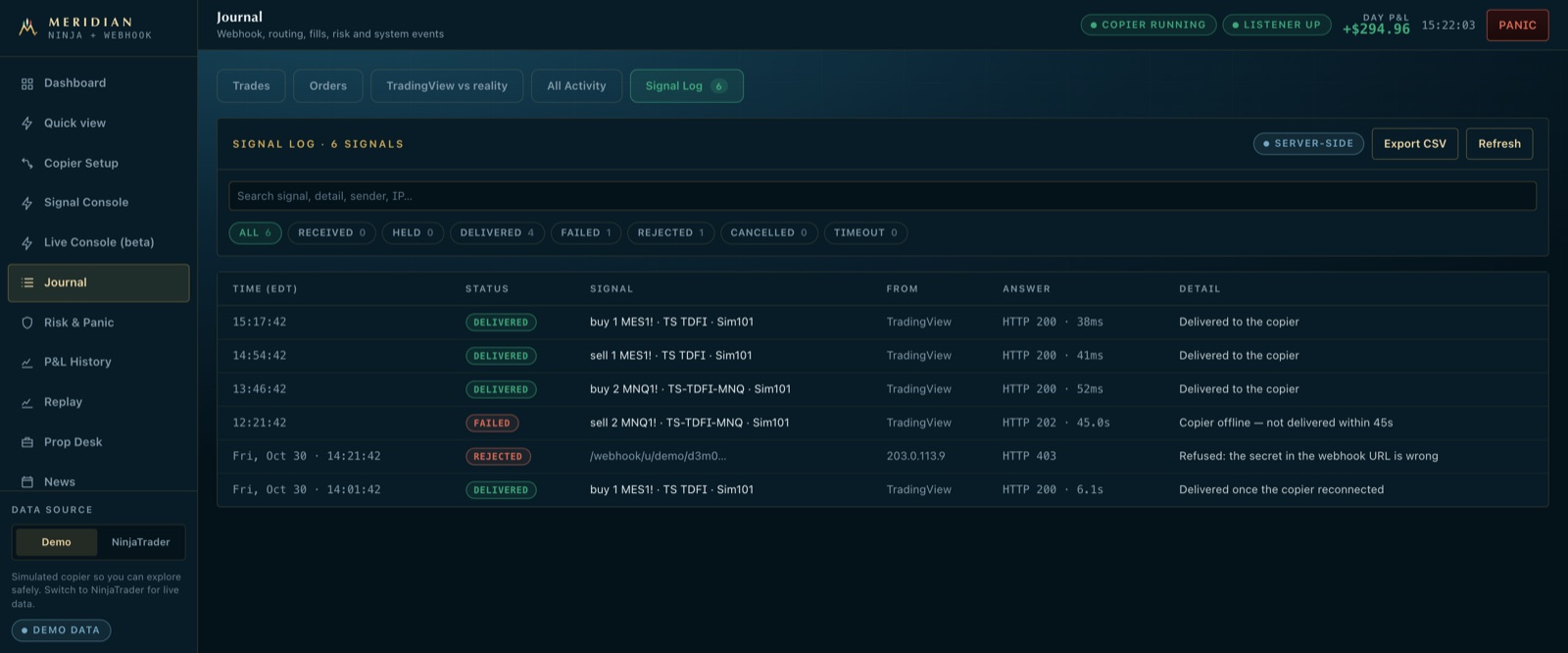
All plansEvery account gets its own signal address with its own secret, and signals sent to it reach only your copier — on your main PC. Your PC dials out to us, so there is no port to open and nothing to rent.
Market, limit and stop orders
All plansBuy, sell, short, cover or flatten, as a market, limit or stop order. TradingView’s own strategy variables work as they are, so one alert message covers every order a strategy sends.
Stops and targets from the alert
All plansA stop and a target in ticks, points or dollars, placed with the entry. Up to five scale-out targets, each with its own stop, so a filled target takes its stop with it.
Break-even and trailing stops
All plansMove the stop to entry once a trade is far enough in profit, and trail it behind the best price after that — set from the alert, run by the copier.
Sized by risk
All plansSend a dollar amount or a percentage of the account instead of a size, and Meridian works out the contracts that lose no more than that at your stop.
In step with your strategy
All plansSend the strategy’s position along with the order, and an exit never opens a reverse position on an account that is already flat. An entry that doesn’t fit waits, flattens or resyncs — your choice.
Late alerts refused, not chased
All plansAn entry that arrives too late to get a sensible price is not placed. You are told, and can resend it on purpose. Exits always go through, however late.
Rotate across accounts
All plansName several accounts in one alert and it goes to the one already in the trade, or the next that is connected and not locked — so when one hits its daily limit, the next signal moves on.
Every alert accounted for
All plansEach alert that reached the copier is in the journal — placed, copied, filled or refused with the reason, including a wrong secret — with how long it took, to the millisecond.
Several strategies, one desk
ProGive each strategy its own secret, see each one’s results, and switch one off or limit its accounts without touching the rest.
Test before it’s real
All plansThe Live Console builds the alert message for you and sends a dry run, so you see exactly what the copier would have done before an alert ever trades.
Check an alert before it goes live
ProBuild a TradingView alert message from a template or paste your own. It is checked as you type against exactly what the copier reads — a misspelt field, a number in quotes, a limit order with no price, risk sizing with no stop — and the sandbox shows what every follower would do with it: size, bracket and scale-outs, with any guard that would cut it. Nothing is placed.
TradingView vs reality
All plansThe price your strategy expected against the fill you got, broken down by time of day and by account.
03 — Live Console
Trade NinjaTrader from a live chart, wherever you are.
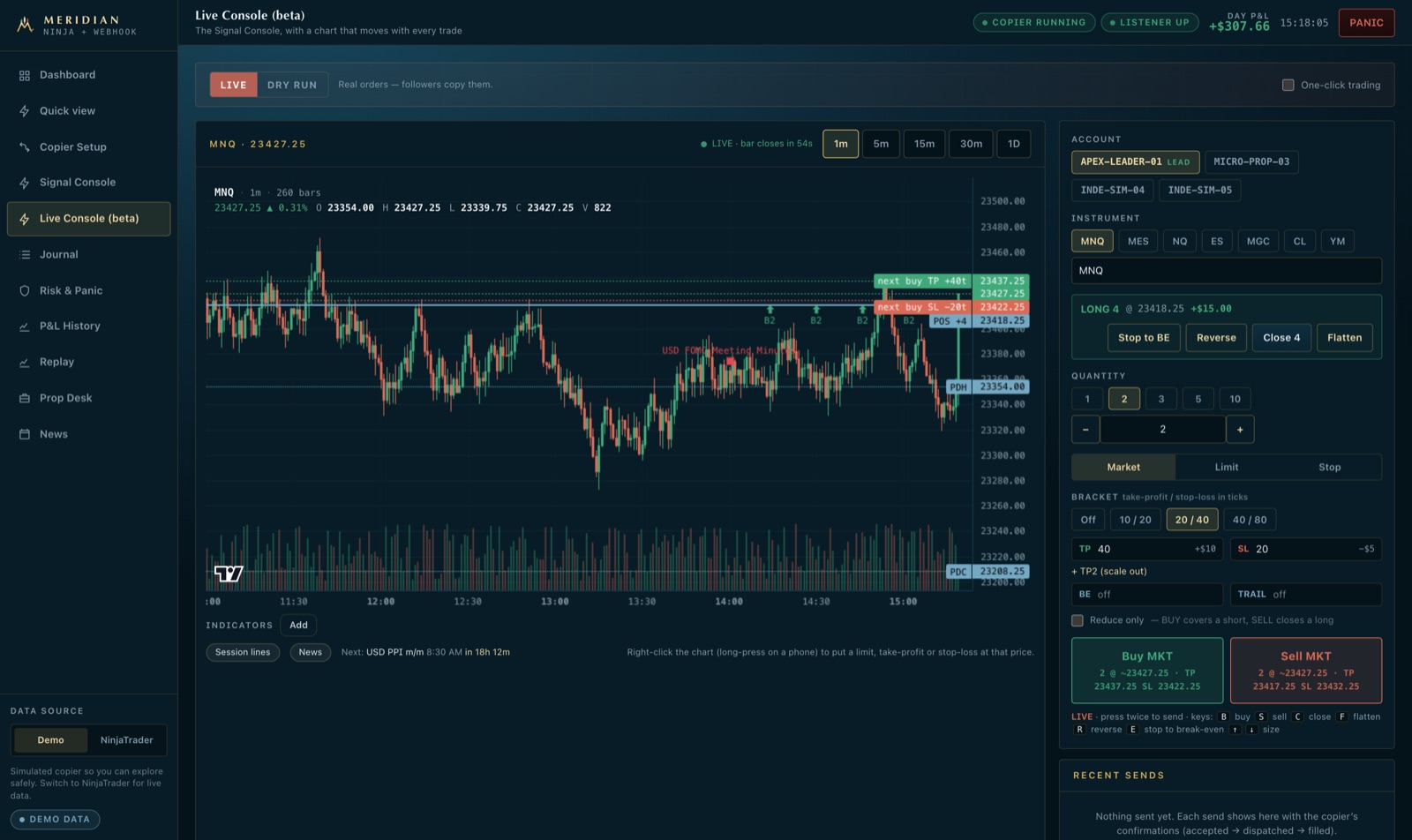
A trading front end for NinjaTrader that runs in your browser. The chart is fed by your own NinjaTrader and moves with every trade; your position and orders are on it; and an order you place goes to your leader, so every follower copies it under every one of your rules.
A chart that updates in real time
All plansThe forming candle moves with every trade NinjaTrader streams, from your own NinjaTrader — no second data subscription. One minute to daily, with a TradingView-style crosshair and scales.
Trade on the chart
All plansA Sell / size / Buy bar sits on the chart, as on TradingView, and on a phone the chart fills the screen with the ticket below it. Right-click the chart — long-press on a phone — and buy or sell right there: a limit or a stop at that price, sized and bracketed from the ticket, in one click. In a trade, right-click where you want out and place its take-profit or stop-loss for the whole position. Your working orders are lines on the chart: drag one to move it, right-click it to cancel it.
Brackets before you send
All plansPick a stop and target from a preset or type your own; both are drawn on the chart before the order goes. Add a second target, break-even and a trailing stop.
What a stop-out would do, before you send
ProSet a stop and the ticket shows every account the order reaches — yours and each follower — with its size, the dollars at risk and what would be left before its drawdown floor or daily limit. An order that would breach one is flagged before it goes.
One bias reading from every angle
ProThe Directional Bias indicator under the chart weighs trend, momentum, VWAP, other markets and order flow into one bullish, bearish or neutral reading. Each factor's vote is in its table, and a factor with no data drops out instead of skewing the result. It also shows how often each reading was followed by a move its way.
The market in one strip, over the chart
ProHow far it is to the nearest level above and below — in points, and in dollars at the size on your ticket — how much of an average day's range is already used, where price sits in today's range, and how long until the next release. Facts to weigh, not a signal.
What your bracket really asks of you
ProSet a target and a stop and the ticket shows the reward-to-risk, the win rate that breaks even at it, and the levels between your entry and the target or the stop — for a long and for a short — before you press anything.
The rest of the market, at a glance
ProVIX, the dollar index, the 10-year yield, ES and NQ with their change on the day and a small chart each, plus whether NQ is leading or lagging ES — so a move in your market can be read against everything else.
Where the session is, in one row
ProThe opening range and initial balance and whether price has left them, today's gap and how much of it has filled, VWAP with its bands, and the half hour's volume against normal — read from the same bars as your chart.
Every timeframe at a glance
ProOne line shows whether 1, 5 and 15 minutes, the hour and the day are trending up, down or neither, each against its 20-bar average and its VWAP.
Alerts at your price
ProRight-click any price on the chart and get a phone and Telegram alert when the market trades there. Your copier watches the price, so the dashboard can be closed.
Tag the setup as you send
ProName the setup on the ticket — “VWAP reclaim”, “opening drive” — and every journal line of that trade carries it, ready to show which setups pay.
Where levels stack up
ProThe chart shades the places where several of its levels — prior-day and overnight highs and lows, the opening range, VWAP, value area — sit within a few ticks of each other, with how many agree, and names the nearest zone above and below the price.
Your open trade, in R
ProWhile you are in a trade, its P&L in R against the stop it started with, the best and worst it has been since you entered, and the next level and zone in its direction — the questions behind every hold, scale-out or stop move.
The Terminal: split charts and a watchlist
ProA TradingView-style trading screen: the chart from NinjaTrader’s own feed, a second chart beside or under it on another symbol or timeframe, a watchlist that folds away for a full-width chart, and the account’s orders, trades and P&L docked underneath. The order bar on the chart drags wherever you want it.
What usually happened next
ProFor the half hour you are in, the console finds past sessions that looked the same — above or below VWAP, inside or outside the opening range, the same kind of gap — and shows what price did over the next hour: the average, the spread, how often it went up. Built from your own NinjaTrader history.
Your rules, on every order
ProWrite the rules you trade by. The ticket checks the ones it can see — with the trend, not into a zone, no release coming, a stop set — and you tick the rest. Over time you see your results when you followed every rule against when you did not.
Your chart, your way
All plansAny timeframe — 3 minutes, 2 hours, 2 days — up to 1,000 bars of history, zoom buttons, and the prior day’s high and low from the full session or regular hours only. Hide the menu or go full screen and the chart and ticket fill the screen.
A key for every action
All plansBuy, sell, close, reverse, flatten and stop to break-even from the keyboard. Stop to break-even moves your followers' stops too, each to its own entry. Every key asks for confirmation unless you switch on one-click trading.
Your position, one tap away
All plansThe open position sits above the buy and sell buttons with its P&L, and one tap closes, reverses or flattens it, or moves its stop to break-even.
Key levels on the chart
All plansYesterday’s high, low and close, the overnight range and VWAP, with the next red-folder release marked, drawn on every chart.
Live or dry run
All plansSwitch to dry run and every order is checked by the copier without being placed — the safe way to learn the console.
The same rules as every order
All plansAn order from the console passes the same daily limits, drawdown floor, contract caps and news guard as an alert does. Nothing typed by hand gets around them.
Laptop or phone
All plansUse it on a laptop away from the trading PC, or add the dashboard to your phone’s home screen.
04 — Account protection
Keep every evaluation alive
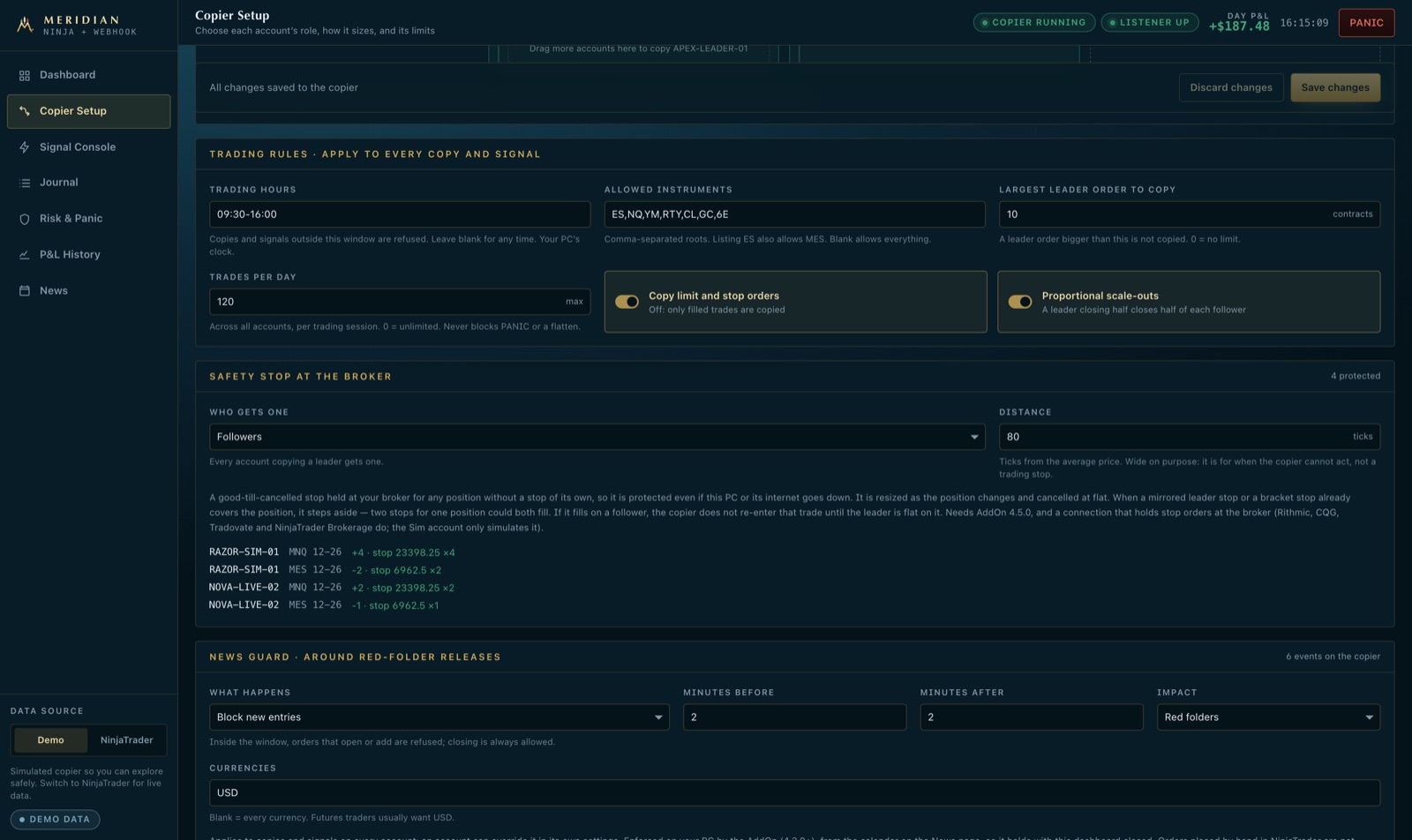
Prop accounts are lost to the drawdown limit, to news releases, and to the trade taken after three losses in a row. Meridian enforces your limits on your own PC, on every account, whether or not you are watching.
Drawdown limit enforced
All plansEach account is tracked against its firm's drawdown limit and flattened and locked at the safety buffer you choose. Restarting NinjaTrader does not unlock it.
A stop that is always there
All plansA protective stop rests at your broker on every position, so a frozen PC or a lost internet connection never leaves a trade unprotected.
Daily limits and trading hours
All plansDaily loss and profit limits, a maximum number of contracts, and the hours each account may trade — with an optional flatten at the close.
News protection
ProNew entries are held around high-impact releases for the window you set, or open positions are flattened before them. You get a reminder before each one.
Discipline rules
ProPause after a losing streak or after any loss, never size up after a loser, cap trades per day, and stop for the week or month at a loss you chose while calm. Exits are never blocked.
A checklist before the open
All plansOptionally, the copier won't start until you have written down the day's bias, maximum loss and plan. Your answers are saved to the journal.
Evaluation tracker
ProProgress to the profit target, trading days counted against the firm's minimum, and the consistency rule checked every day. Presets for the major firms.
Consistency guard
ProProp firms cap how much of your profit one day may make. Once today reaches that cap, the copier stops new entries for the day — or flattens and locks the account to bank it. Your choice, per account.
Live trailing drawdown
ProSee how far each open position can go against you before the drawdown floor, and where the floor moves if you take the profit or give it back. The peak follows the best price between readings, the way the firms track it. Set steps as the room shrinks: a warning, then half-size entries, then exits only.
Payout-zone lock
ProOnce an account reaches its payout zone, name the balance to keep. If the account falls back to it, the copier flattens and locks it — a payout-eligible balance is not handed back to the market.
Exposure caps across correlated markets
ProLong NQ, ES and YM on five accounts is one big bet. Set a dollar cap per account or for the whole desk across markets that move together; entries past it are cut to what fits, while exits always go through. And because most prop firms forbid hedging, you can also refuse counter positions — long NQ on one account, short ES on the same or another.
Prop Desk
ProEvery evaluation fee and payout in one ledger, what each funded account could withdraw and when, and whether your strategy would have passed a firm's rules.
One button for everything
All plansPanic flattens every account and stops all copying in one confirmed action — from the desk or from your phone.
05 — Review
Replay it. Practise it. Get better at it.
Go back over any session with your real fills on it, practise it until the second attempt beats the first, and see what a rule would have changed.
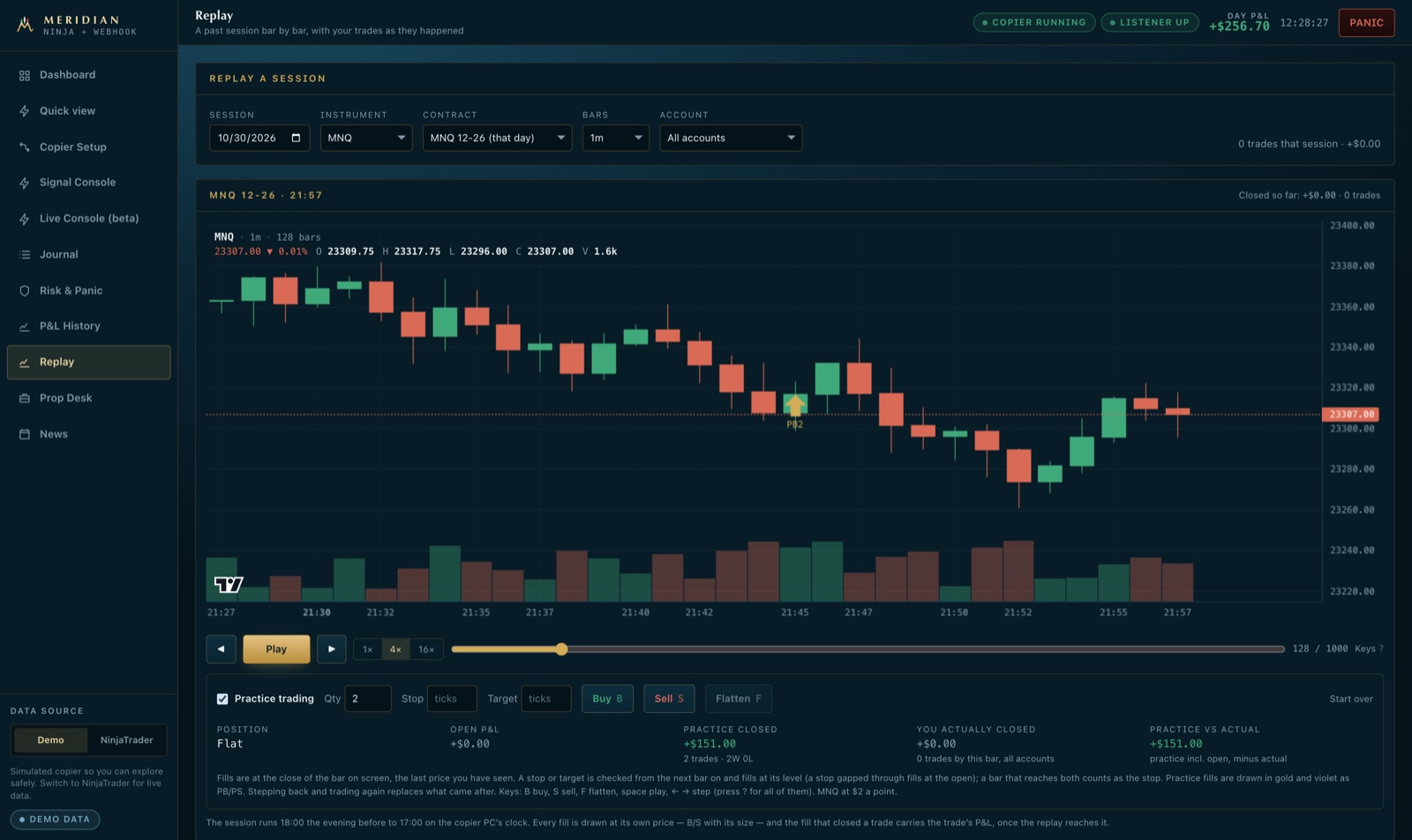
Session replay
All plansPlay back any past session of any instrument bar by bar, at up to sixteen times speed, with every fill at its own price and each trade's result where it closed. Older sessions open on the contract that was trading that day, and the whole replay can be driven from the keyboard.
Practice trading
All plansTrade the replay on paper — with a stop and target if you like — and compare your practice result with what you actually made by that point in the day.
Rule simulator
All plansWould a daily loss limit, a trade cap or skipping Fridays have helped? See your real trades replayed through any rule, next to what actually happened.
Best and worst moments
All plansFor every trade: how far it went against you before it worked, and how much more it ran after you closed it.
Patterns that cost you money
ProMeridian reads your own closed trades for what loses money — entries late in the session, trading on after losses, jumping back in after a loser, sizing up — prices each one, and puts the rule that stops it on with one tap.
What your overrides cost
ProWhen you close a TradingView strategy’s trade by hand, Meridian compares it with the strategy’s own exit — so you see, in dollars, whether stepping in helps or hurts. No broker statement can show it.
A journal that explains itself
All plansEvery signal, order, fill and safety action is recorded in plain words, filterable by account and instrument. Speed figures for every copy are on Pro.
06 — Alerts, Telegram & mobile
Stay in control from anywhere
You shouldn't need a remote desktop to know your accounts are fine. Meridian tells you the moment something needs you — on your phone, in Telegram or by email — and lets you act on it in a tap.
Quick view, as it opens from the home screen. Illustrative figures.
APEX-50K-03 reached its daily loss limit — flattened and locked until tomorrow.
Day P&L +$1,240 across 6 accounts
3 in a position · 1 locked
Alerts and commands in your own Telegram chat. Illustrative.
A mobile app, no download
All plansAdd the dashboard to your iPhone or Android home screen and it opens as an app: the day's P&L, every position, anything holding an account, the next news release, and a two-tap flatten.
Instant alerts
All plansThe copier going offline, a risk limit reached, an order rejected, a follower out of step, a broker connection lost — each one as it happens, and again when it's resolved.
Push notifications
All plansSafety alerts reach your phone or desktop on every plan, even with the app closed. On Pro, every other alert can too.
Control from Telegram
ProCheck the desk with /status, pause or resume copying, and flatten everything — straight from your own Telegram chat, with a confirmation tap. Only your chat is obeyed.
Escalation when it matters
ProIf the copier goes down while you have open positions, you get an urgent alert within 30 seconds on every channel, naming the accounts in the market, with an “I’m on it” button — and further rounds until someone acknowledges it.
Your own alert rules
All plansBe told when the day's P&L reaches a loss or a target, when profit gives back a set amount, or when a strategy hasn't sent a signal for a while.
Quiet-strategy alerts
ProMeridian learns when each strategy usually starts trading, and tells you when one is unusually late — so a broken alert never looks like a slow day.
A note for every closed trade
All plansOptionally, each trade as it closes, with its result and account — an easy way to follow the desk without watching it.
A brief before the open
ProAt 8:45 am New York, one message with what matters today: whether your copier PC is on, yesterday's P&L, each prop account's room above its drawdown limit, anything held overnight and the day's major news.
Daily and weekly reports
ProEvery account's P&L and every closed trade, emailed after the close each day — plus a weekly review of your best and worst hours.
07 — Automation & Twin Desk
Set it up once. Run it every day.
Let the routine run itself: the copier starts and stops on time, layouts switch in one click, and on Pro a second PC can keep in step with your main one.
Schedule
ProStart copying at the open and flatten and stop at the close, on the days you choose — US market holidays skipped automatically. It runs on your PC whether you're there or not.
Saved setups
ProKeep your evaluation layout, your funded layout and your cautious-day layout under their own names, and switch between them in one click.
Per-strategy control
ProRun several TradingView strategies side by side, see each one's results, and switch one off or limit its accounts without touching the rest.
Ready for the open
All plansOne check before the session: PC connected, copying on, signals reaching you, positions protected. Anything missing is listed with the page that fixes it.
Twin Desk
ProIf your broker logins live in separate NinjaTrader installs, your second PC can follow your main PC's positions — each account at its own size, with its own safety rules. Signals only ever go to your main PC.
Your PCs, your control
ProSwap which PC takes your signals in one click — handy when you move desks. Twin Desk only works between your own PCs, never anyone else's.
08 — AI assistants
Ask your desk anything. Act on it with a tap.
On Max, connect the AI assistant you already use — Claude, ChatGPT, Cursor or any other that supports MCP — to your own desk. Ask how your evaluations stand, why a copy missed, or what's on the calendar, and get answers from your live accounts. Let it place an order, flatten or pause copying, and every request comes to your phone first.
Nothing moves money until you tap. Illustrative.
Works with the assistant you use
MaxClaude, ChatGPT, Cursor and any assistant that speaks MCP. Create a link in your dashboard, paste it into the assistant once, and it can see your desk.
Answers from your live desk
MaxAccounts, positions and P&L, closed trades, room above each drawdown limit, the copier's own log, copy problems and the news calendar — read from your PC as it is now.
Your tap on every trade
MaxOrders, flattens and pausing arrive in Telegram and on your dashboard with Approve and Cancel. Nothing is sent until you approve, and a request you ignore simply expires.
The same rules as every signal
MaxAn approved order goes through the copier exactly like a TradingView alert: your loss limits, drawdown floor, contract caps and news protection all still decide.
Limits you choose
MaxLook-only or trading links, the accounts and instruments each one may use, and its largest order. Skip the tap only on accounts you name, such as a simulation account.
Revoke in one click, every call logged
MaxEach assistant has its own link. See everything it asked and did, and switch it off at once if you ever need to.
Your own systems, too: a read-only API and event webhooks
Feed a spreadsheet, a trade journal or your own monitoring straight from your desk. API tokens read your accounts, trades, P&L and the copier's journal — and can never place an order or change a setting. Webhooks tell your server the moment something happens, signed so it knows the message is from Meridian.
Read-only API tokens
ProDesk, closed trades, P&L by session, the copier journal, copy problems and alerts — each token limited to what you tick and, if you like, to some accounts. A leaked token can show data, never trade.
Signed event webhooks
ProA trade closed, a copy failed or slipped, a guard tripped, the broker rejected an order, the copier PC dropped — sent to your https endpoint with an HMAC signature, in order.
Retries and a 7-day replay
ProA receiver that is down is retried and resumes where it stopped; every event also stays in your event feed for 7 days, so nothing is lost to an outage. Changing your password revokes every token.
09 — Security & reliability
Private by design. Watched around the clock.
Meridian is built to be trusted with real accounts: your signals stay yours, the service is monitored continuously, and nothing changes underneath you during market hours.
Your signals stay private
All plansEach account gets its own private signal address and secret. Nobody else's alerts can reach your copier, and yours can't reach theirs.
You know every sign-in
All plansA sign-in from a new browser alerts you at once, with a "That wasn't me" link that signs everyone out and resets your password. Your profile lists every session, each with its own Sign out — and an idle dashboard signs itself out after 15 minutes.
Nothing to open on your network
All plansYour PC connects out to Meridian over an encrypted connection — no router settings, no firewall changes, no server to rent.
Monitored every few minutes
All plansThe full signal path is tested automatically throughout the session, and a public status page shows the service's health at any time.
Backed up, and tested
All plansYour account data is backed up every night and a full restore is rehearsed every week — so a backup is known to work before it's ever needed.
No surprises in market hours
All plansServer updates are held until the market is closed, so your copier is never disconnected mid-session for maintenance.
Works with your setup
All plansAny NinjaTrader 8 connection — Rithmic, CQG, Interactive Brokers or simulation — and any alert source that can send a webhook, TradingView included.
See it on your own accounts
The free trial includes every feature on this page, needs no card, and takes about twenty minutes to set up.