
TradingView webhooks for NinjaTrader 8
Your TradingView alerts,
traded on every account.
Paste one private address into a TradingView alert and every signal becomes a real NinjaTrader order — about 30 ms from alert to working order — with its stop, targets and size worked out for you. Then the copier takes it to every follower account, and reads each one back to make sure it landed.
Webhooks are on every plan, and the free trial needs no card. TradingView itself offers webhook alerts on its paid plans.
- 01TradingView alert fires
Your strategy or indicator sends its message.
- 02Your private address
Only your account's secret gets in; anything else is refused at the door.
- 03Your PC
Delivered over the link your PC opened — no port forwarding, no server.
- 04Checked, then placed
Timing, your limits and the news guard decide; then the order goes to your leader.
- 05Every follower
Copied in under a millisecond, sized for each account, then verified.
What an alert can say
Far more than buy and sell
The alert message is a short block of JSON. The dashboard writes the basic one for you; add any of these to it and the copier does the rest — on the leader and on every follower.
Any order
All plansBuy, sell, short, cover or flatten — as a market, limit or stop order. TradingView's strategy variables work as they are.
Stop and target with the entry
All plansIn ticks, points or dollars per contract, converted to whole ticks on the instrument — a stop rounds toward the entry, so it never risks more than you wrote.
Up to five scale-out targets
All plansEach target with its own size and its own stop, one-cancels-the-other, so a filled target takes its stop with it.
Break-even and a trailing stop
All plansMove the stop to entry once the trade is far enough in profit, then trail it behind the best price. A stop only ever moves toward the market.
Size by risk
All plansSend a dollar amount or a percentage of the account, and the entry is sized to lose no more than that at the stop — with the quantity as a ceiling.
Strategy sync
All plansSend the strategy's position with the order and an exit never reverses an account that's already flat. An entry that doesn't fit the account waits, flattens or resyncs — you choose.
Rotate across accounts
All plansName several leader accounts and the alert goes to the one already in the trade, or the next that is connected and not locked.
One strategy at a time
ProName the strategy and it can have its own secret and its own off switch, with its own results.
Duplicates dropped
All plansGive each alert an id and, with the duplicate guard on, a repeat inside the window is ignored instead of doubling your position.
Examples
Four alert messages to start from
Replace YOUR_LISTENER_SECRET with the secret on
Copier Setup → Webhook listener and the account with your leader's name.
Every field is described in the setup guide.
A strategy order with a bracket
Each entry gets a 40-tick stop and an 80-tick target.
{
  "secret": "YOUR_LISTENER_SECRET",
  "account": "APEX-50K-01",
  "instrument": "{{ticker}}",
  "action": "{{strategy.order.action}}",
  "orderType": "Market",
  "quantity": {{strategy.order.contracts}},
  "stopLossTicks": 40,
  "profitTicks": 80
}
Scale out, then protect the rest
Three contracts out at three targets; break-even at +20 ticks, then a trailing stop.
{
  "secret": "YOUR_LISTENER_SECRET",
  "account": "APEX-50K-01",
  "instrument": "MNQ",
  "action": "Buy",
  "orderType": "Market",
  "quantity": 3,
  "stopLossTicks": 40,
  "targets": [
    {"ticks": 20, "qty": 1},
    {"ticks": 40, "qty": 1},
    {"points": 20}
  ],
  "breakevenTicks": 20,
  "trailTicks": 16,
  "trailStartTicks": 40
}
Sized by risk
Risk half a percent of the account at a 10-point stop, never more than 10 contracts.
{
  "secret": "YOUR_LISTENER_SECRET",
  "account": "APEX-50K-01",
  "instrument": "{{ticker}}",
  "action": "{{strategy.order.action}}",
  "orderType": "Market",
  "riskPct": 0.5,
  "quantity": 10,
  "stopLossPoints": 10
}
Kept in step with the strategy
Accounts follow the strategy's position; one that doesn't fit is flattened and waits for the next entry.
{
  "secret": "YOUR_LISTENER_SECRET",
  "account": "APEX-50K-01",
  "instrument": "{{ticker}}",
  "action": "{{strategy.order.action}}",
  "orderType": "Market",
  "quantity": {{strategy.order.contracts}},
  "market_position": "{{strategy.market_position}}",
  "prev_market_position": "{{strategy.prev_market_position}}",
  "position_size": {{strategy.position_size}},
  "out_of_sync": "flatten"
}
Not sure a message is right? The dashboard's Live Console sends it as a dry run and shows exactly what the copier would have done, without placing anything.
When an alert shouldn't trade
Every alert is accounted for
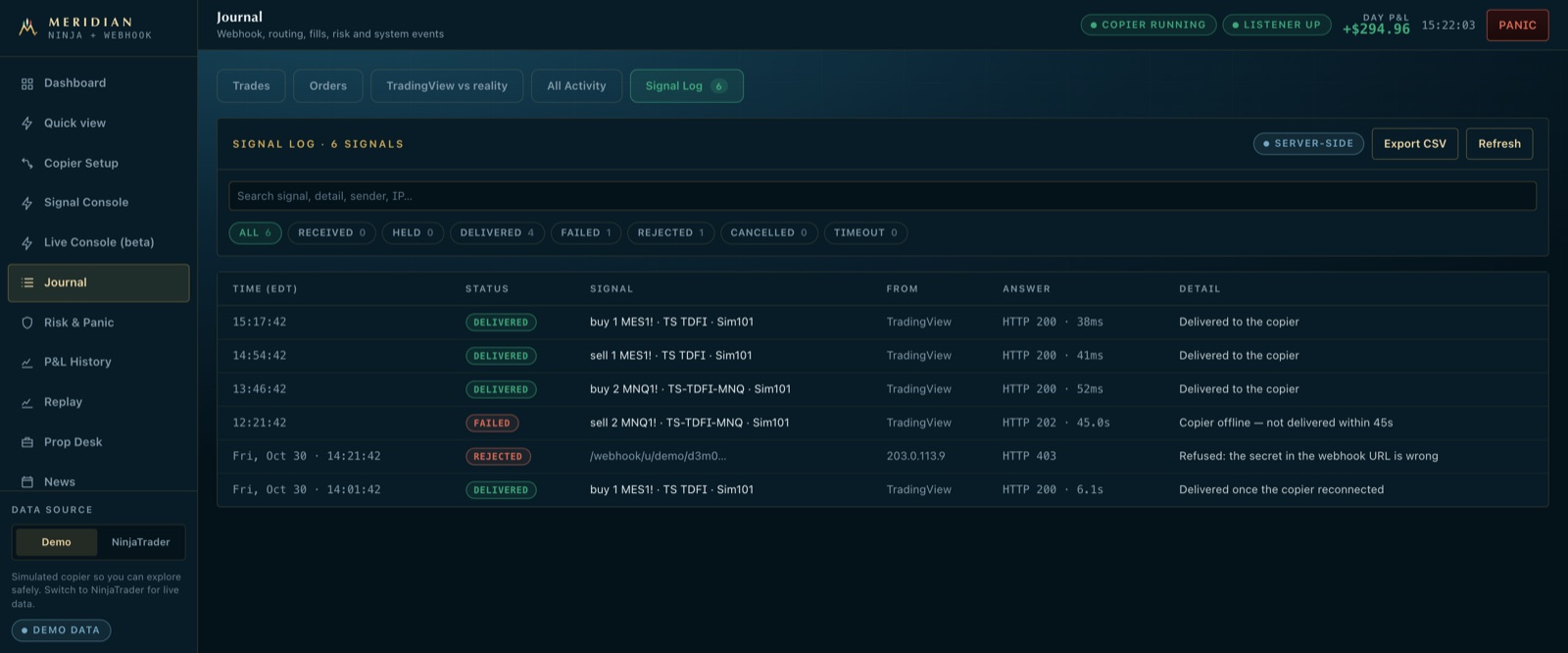
A webhook that fails silently is how an account ends up long when you thought it was flat. Meridian records every request that reached it, and says in plain words what it did.
- ✓Wrong secret — refused before it becomes a signal, and still listed, with where it came from.
- ✓Late — an entry that arrives too late (three seconds by default) is not chased; you're told and can resend it on purpose. Exits always go through.
- ✓Against your rules — a daily limit, the drawdown floor or the news guard holds it, with the reason.
- ✓PC reconnecting — an alert is held for a few seconds while your PC's link comes back, and delivered when it does.
- ✓Copier offline — the alert is marked not delivered, and you get a push, email or Telegram alert that the copier is down.
Straight answers
About webhooks
Does my PC need to be on?
Yes — the orders are placed by NinjaTrader on your PC. The PC dials out to Meridian, so it needs no open port or fixed address, and it reconnects on its own after a drop.
Can someone else send orders to my address?
Your address carries a secret only you can see, and the message carries a second one. A wrong secret is refused at the edge with the same answer as an account that doesn't exist, so an address can't be probed.
Does it work with alerts from something other than TradingView?
Yes. Anything that can send a webhook with a JSON body — another charting platform, your own script — works the same way. The TradingView variables are a convenience, not a requirement.
Is Meridian a signal service?
No. The signals are your own — your strategy, your alerts. Meridian places and copies the orders they describe between your own accounts, and never suggests a trade.