
Prop risk management
Built around the rules that end prop accounts
Evaluations are rarely lost to one bad idea. They are lost to a trailing floor that moved while you weren't looking, a good day handed back, two accounts in markets that move together, a release you forgot, and the trade after three losses. Meridian enforces each of these on your own PC, on every account, before an order goes out — not after the damage shows up in a report. Restarting NinjaTrader is not a way around any of it.
01 — Before the floor
Know your room before the trade, not after it
A trailing drawdown follows your best moment, not your balance. Meridian follows it the same way — the best price an open position reached, not a sample taken every few seconds — and turns it into the number you actually need: how far each position can go against you before the account is gone.
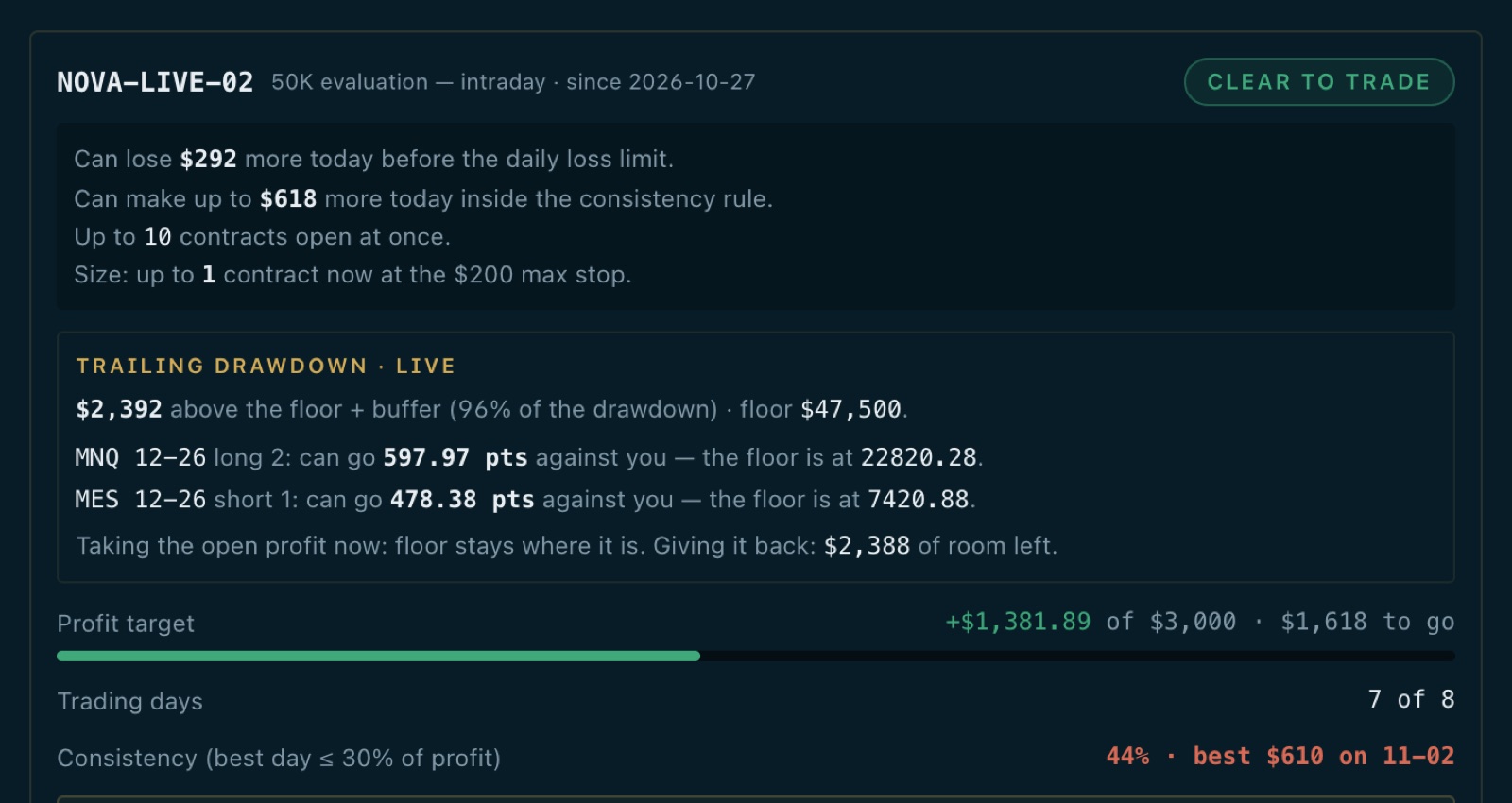
The drawdown floor, enforced
All plansIntraday trailing (open profit counts), end-of-day trailing, or a static floor — with the point where the floor stops trailing. Reach your buffer above it and the account is flattened and locked for the day.
Live trailing drawdown
ProRoom to the floor in dollars, and in points for every open position, with the price at which each one would breach it. Plus the two answers that decide the next click: where the floor sits if you close now, and what is left if the open profit is given back.
Steps as the room shrinks
ProChoose the share of the drawdown left at which you are warned, at which new entries are halved, and at which the account goes to exits only. Each step tells you once as it tightens; closing a position is never blocked.
Daily loss and size limits
All plansA daily loss limit and a cap on open contracts per account — an entry past the cap is cut to what fits — with the dashboard telling you, before you trade, how much more today can cost.
Firm presets that keep up
ProStart an account from a preset for the major firms. When a firm changes its rules and the preset is updated, every account set from the old numbers is flagged with exactly what changed — update it in one click, or keep yours.
A restart changes nothing
All plansPeaks, locks and the day's numbers are kept on disk. Closing NinjaTrader at the floor and opening it again finds the account exactly as locked as it was.
02 — Keeping what you made
A good day is not handed back
The most expensive losses on a funded account come after it has done its job. These rules protect the balance you have already earned, and the shape of the profit the firm will judge.
Payout-zone lock
ProName the balance to keep once the account reaches its payout zone. From then on that balance is the floor that matters: fall back to it and the copier flattens and locks the account, so a payout-eligible balance is never traded back below the line.
Consistency guard
ProFirms cap the share of your profit one day may make. Once today reaches that cap, the copier stops new entries for the day — or flattens and locks the account to bank it. Your choice, per account.
The evaluation, as a plan
ProProgress to the target, trading days against the firm's minimum, and the consistency rule checked every day — turned into a plan: how much more to make, how many days, the most any one day should make, and the earliest date you can pass.
04 — Around the trade
The losses that have nothing to do with the setup
A stop resting at the broker
All plansSet a maximum stop and every copied position carries it on the broker's side, so it is protected even if your PC, NinjaTrader or the internet goes down.
News protection
ProNew entries held around high-impact releases for the window you set, or positions flattened before them, with a reminder ahead of each one.
Discipline rules
ProA pause after a losing streak, no sizing up after a loser, a cap on trades per day, and a weekly or monthly stop chosen while you were calm. Exits are never blocked.
A checklist before the open
All plansOptionally, the copier won't start until you have written down the day's bias, maximum loss and plan. The answers go to the journal.
Every guard, before a signal is live
ProPaste a TradingView alert into the sandbox and see what each account would do with it — and which of these rules would cut or refuse it. Nothing is placed.
Copies that match their leader
All plansEvery follower is read back against its leader after each trade. A missed fill or a rejected order is corrected with the leader's stop and target attached, instead of leaving an account unprotected or off-side.
05 — When something breaks
Out of the market from wherever you are
Panic, from your phone
All plansOne confirmed action flattens every account and stops copying — from the dashboard in any browser, with no remote desktop and no NinjaTrader window.
Told within seconds
All plansA push and an email when the copier goes offline, a risk limit is hit or an order is rejected — on every plan. Telegram, with commands to pause or flatten, comes with Pro.
Escalation mid-trade
ProIf the copier drops while positions are open, an urgent alert goes out on every channel within 30 seconds, naming the accounts in the market, with an “I'm on it” button — and it goes out again if nobody answers.
06 — The business side
Prop trading is a business. Keep its books.
Prop Desk
ProEvery evaluation fee and payout in one ledger, and what each funded account could withdraw and when.
Would it have passed?
ProYour real closed trades replayed through each firm's evaluation rules, with the largest size the strategy would have passed at — before you pay for the next evaluation.
Firms word their rules differently and change them. Meridian enforces the numbers you set for each account; confirm them against your firm's current terms. Each rule applies once you set it for an account, and a protection you have set keeps working whatever plan you are on.